Quickstart
This walkthrough takes you from a new Telegram account to your first PolyBot trade. Processing time depends on the selected funding route, blockchain confirmation, wallet setup, liquidity, and indexing.
- Telegram
- A currently supported asset and network shown by PolyBot's deposit picker
- Eligibility to use PolyBot and Polymarket in your location
1. Set up PolyBot
- Open PolyBot in Telegram and run
/start. - Read and accept the current terms and compliance confirmation.
- PolyBot creates a self-custodial Polygon Safe for your account.
- Open the main menu. Normal PolyBot wallet actions use sponsored gas, so you do not need to manage POL.
2. Deposit funds
- Run
/walletor open Wallet → Deposit. - Select a network and asset from the live picker.
- Review the displayed minimum, routing details, and deposit address.
- Send only the selected asset on the selected network to that displayed deposit address.
- Wait for confirmation/conversion, then refresh Wallet.
Supported networks, assets, minimums, and routes can change. The Polymarket profile/trading address shown elsewhere on the wallet screen is not the deposit address.
Your tradeable funds appear as the pUSD tradable balance. Open limit orders and managed-strategy allocations are shown separately because they are not freely available for a new order or withdrawal.
3. Place a first market buy
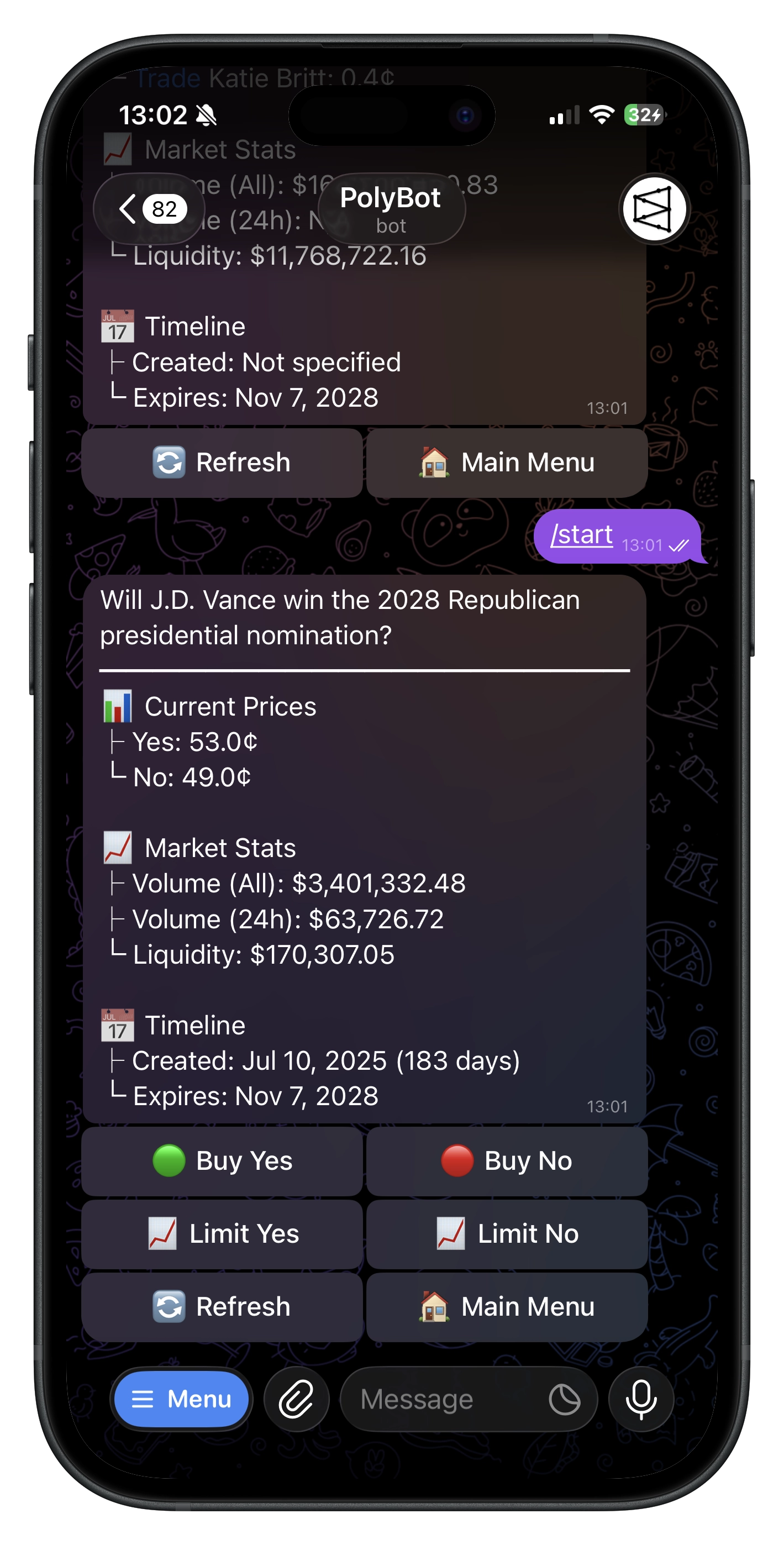
- Paste a Polymarket URL in the bot, browse with
/search, or open the Mini App with/app. - Open a market and choose the exact outcome.
- Choose a quick-buy amount or enter a custom amount.
- Review the current price, estimated shares, fee, and total.
- Confirm and then check Portfolio for the filled position.
A market buy is an execution attempt, not a guaranteed fill. Price and liquidity can change after the review screen, producing slippage, a partial fill, or no fill.
4. Place a limit buy
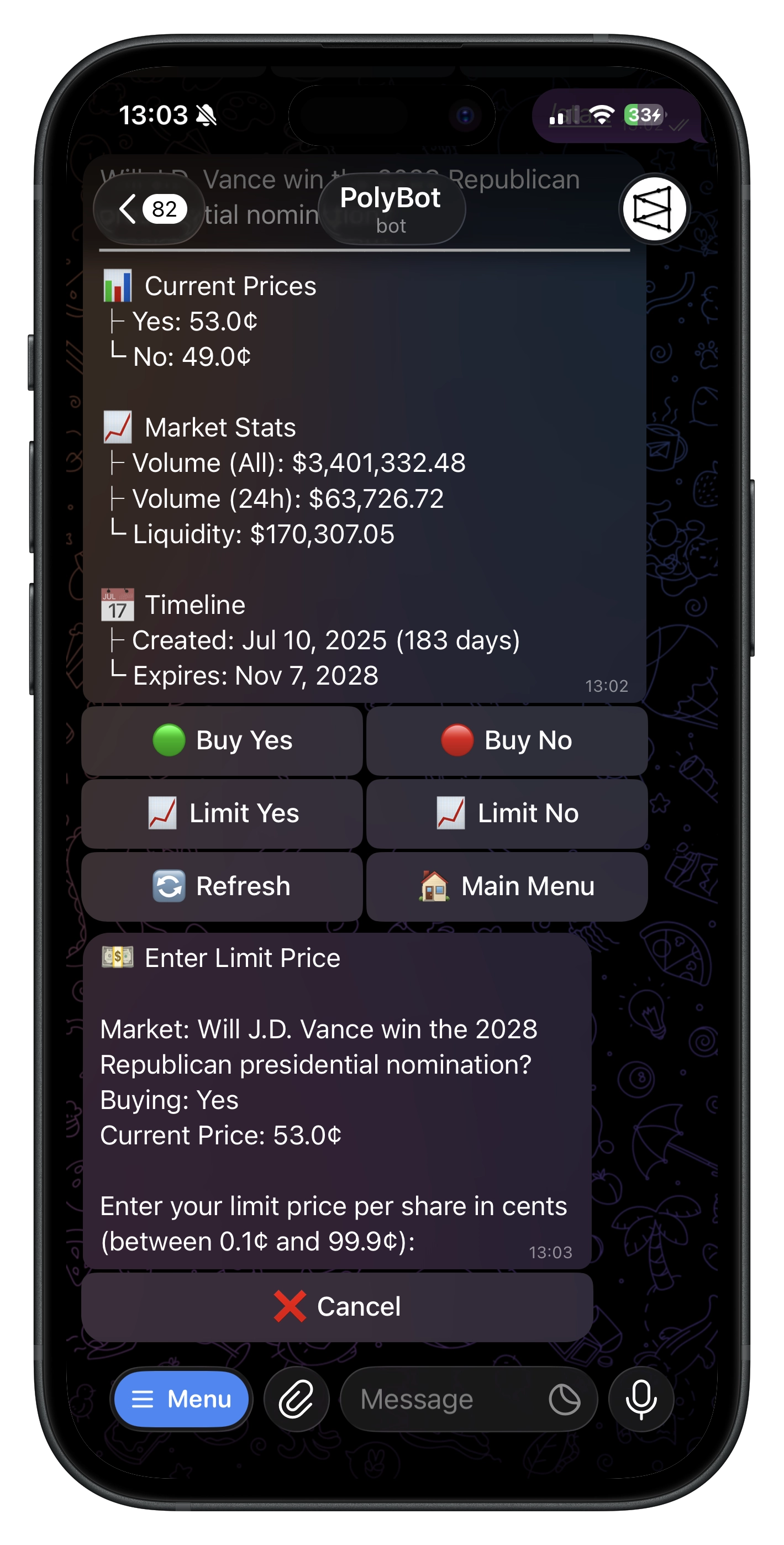
- Choose Limit on the market.
- Enter the highest price you accept and the dollar amount.
- Review the approximate shares and whether the order may cross the current book.
- Submit the GTC order.
A limit order protects your price ceiling, but it can remain open or never fill. Manage it from /orders or All Tools → Limit Orders in the Mini App.
5. Manage or sell the position
Open /portfolio or the Mini App's Portfolio tab. From a position you can:
- buy more;
- market-sell part or all of the available shares;
- place a GTC limit sell;
- add a preset or standalone stop loss;
- generate a PnL card; or
- redeem/clear after resolution.
If an open limit sell reserves some shares, Telegram asks whether to keep the orders or use Cancel & Sell Now. PolyBot submits the market sell only after it safely cancels and verifies the matching reservations. If that cannot be verified, no market sell is submitted.
6. Add exit automation
- Use Presets for reusable take-profit, stop-loss, and trailing-stop rules.
- Use a standalone stop loss on an individual position.
- Use Auto Trader for recurring crypto Up/Down entry and exit rules.
No automated exit can guarantee a fill. Read the Stop-Loss Guide before relying on one for protection.
7. Withdraw
- Open
/wallet→ Withdraw or the Mini App Portfolio withdrawal sheet. - Enter the Polygon destination address.
- Choose one of the receive assets currently offered.
- Enter an amount within the displayed limits and available balance.
- Complete 2FA if enabled and confirm.
Open orders, pending fees, strategy allocations, and other reservations can reduce the withdrawable amount.
8. Explore the rest of PolyBot
- Mini App — visual markets, portfolio, and tools
- Smart Wallet Discovery and Copy Trading
- Parlays and Trading Competitions
- HFT Strategies
- Market Alerts
- Groups and Referrals
See the Commands Reference for all current Telegram commands.
Troubleshooting
- Deposit not visible — verify network/asset/address, wait for confirmations or bridging, and refresh.
- Order failed — check tradable balance, price protection, market status, and available liquidity.
- Position not visible yet — a submitted order may still be filling or indexing; check Orders and refresh Portfolio.
- Withdrawal rejected — check the destination, live limits, 2FA, and withdrawable—not total—balance.
You control a self-custodial Safe. Store any exported signer key offline and never share it. PolyBot is not available to U.S. persons or people located in the U.S.