HFT Strategies Beta Guide
PolyBot's managed HFT product is an official beta with a live catalog of BTC strategies. Choose from the strategies currently shown in the bot, allocate dedicated capital, and let each subscription process eligible short-lived signals under its own execution and risk rules.
HFT does not mean guaranteed speed, guaranteed fills, or guaranteed profit. Any beta strategy can lose money. A signal can be routed to another time slot, skipped by a safety check, rejected, partially filled, or left unfilled. You remain exposed to market, liquidity, strategy, and infrastructure risk.
The catalog is dynamic. Throughout the beta, PolyBot may publish, update, pause, or retire strategies as testing, liquidity, market conditions, and risk controls evolve. A strategy available today may change or close to new subscriptions later, and returning another week may show different options or behavior. Continuous development is not a promise of better performance or profit.
The 60-second explanation
You choose a strategy that is currently available and allocate capital to that subscription. PolyBot then manages its eligible signals:
- Choose a strategy from the current beta catalog.
- Review its market cycle and execution style.
- Allocate capital and confirm the subscription.
- When a strategy signal arrives, PolyBot checks timing, subscription state, wallet state, and risk rules.
- The signal is routed to an eligible subscription time slot.
- PolyBot calculates an order size within the capital allocation and submits it using the selected execution style.
- The result is recorded as filled, open, skipped, expired, or failed.
The allocated amount is a strategy budget, not an amount spent on every signal. PolyBot decides the individual order size within that budget.
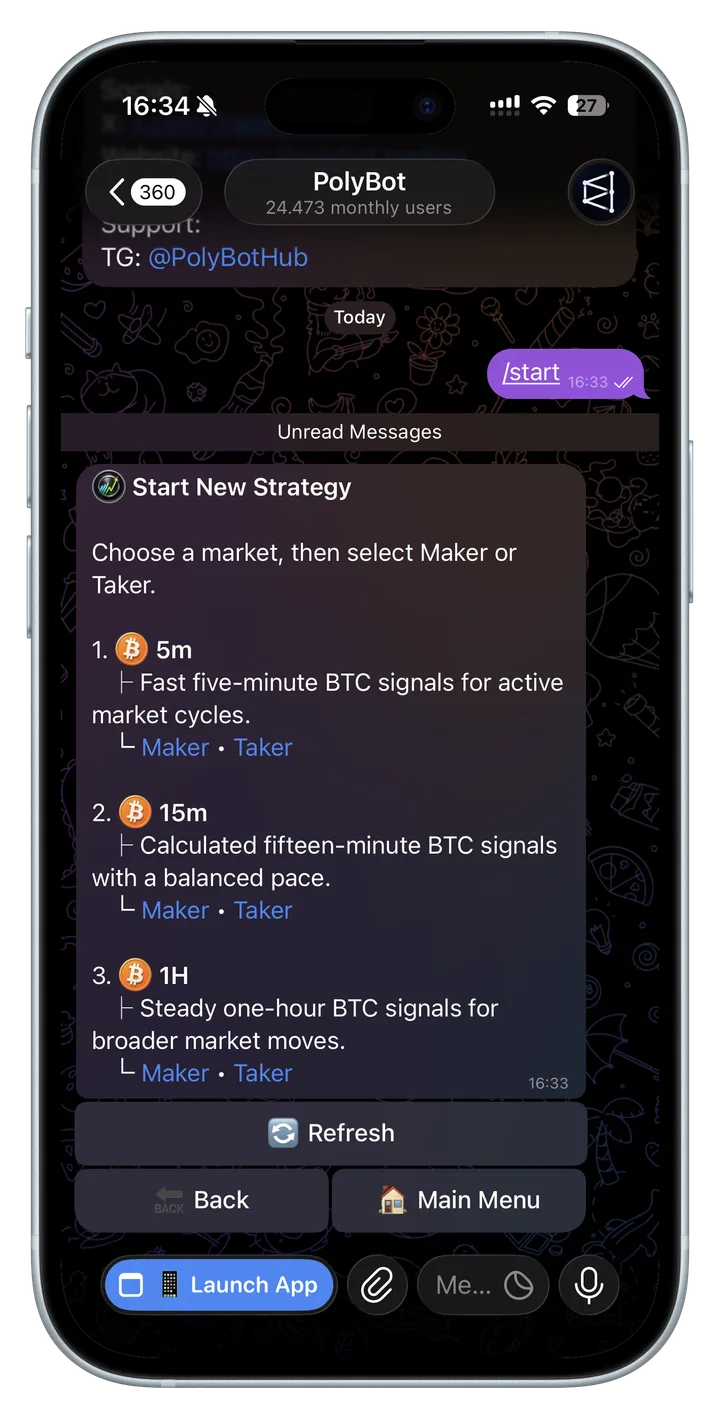
Choose from the current managed catalog
The bot is the source of truth for what can be started now. The catalog can include different BTC market cycles and execution styles, but not every combination is guaranteed to remain available.
| Catalog detail | What it tells you |
|---|---|
| Market cycle | Which BTC market duration the strategy follows |
| Execution style | How eligible orders interact with the order book, such as Maker or Taker |
| Availability | Whether the strategy is currently open for new subscriptions |
| Current setup | The live minimum capital, presets, labels, and controls shown by the bot |
The market duration describes the BTC market cycle the strategy follows. It does not promise a trade every market cycle. Valid signals, capacity routing, available capital, risk checks, liquidity, and execution still decide whether an order is attempted or filled.
Each activation is a separate subscription with its own strategy name, execution mode, capital allocation, status, activity, and performance. Review your total allocated balance before activating another strategy; using several strategies increases the amount of capital and risk you may have in play. If a strategy later closes to new users, existing subscription controls and any migration or retirement notice shown in the bot remain the source of truth.
HFT versus Auto Trader
These are different products:
| Managed HFT strategies | Auto Trader | |
|---|---|---|
| Who defines the trade logic? | PolyBot's managed strategies and signal source | You define the entry and exit rules |
| What do you configure? | Market cycle, Maker or Taker, capital, and notifications | Markets, entries, exits, timing, and execution settings |
| Typical order behavior | Short-lived signals using the chosen Maker or Taker style | Your configured rules and execution mode |
| Best for | Users who want a managed strategy from the current beta catalog | Users who want to design their own automation |
Use the Trading Strategies Guide if you want to build the rules yourself.
What “high frequency” means here
HFT describes the strategy's ability to process short-lived opportunities repeatedly and quickly. It does not promise that your account will trade constantly.
The number of attempted trades depends on:
- how many valid signals exist;
- which time slot receives each signal;
- available capital and current exposure;
- the selected Maker or Taker execution checks;
- wallet, market, and Polymarket availability;
- order-size and other safety checks.
A quiet Activity screen can be normal. Check the recorded skipped reasons before assuming the strategy is broken.
Dedicated capital
When you activate a managed strategy, you allocate part of your wallet balance to that subscription.
- The allocation is a maximum working budget for the strategy.
- It is not a separate wallet and it is not transferred to PolyBot.
- It is not the size of every trade.
- Capital already committed to positions or open orders is not freely available.
- Increasing the allocation gives the strategy more room, but also increases potential exposure.
The setup screen shows the current minimum and available presets. These values can change as the strategy and market conditions evolve, so use the values shown in the bot rather than an old screenshot.
Your funds remain in your trading wallet, but authorized automated orders can still lose money. Allocate only an amount you can afford to put at risk.
Capacity, signal routing, and time slots
Polymarket liquidity is finite. If every HFT subscriber placed the same order at the same timestamp, those wallets would compete with one another, consume the available liquidity, and change the opportunity they were trying to trade.
PolyBot uses capacity-aware market time slots instead:
- The strategy has a maximum amount of capital it can responsibly support for current market conditions.
- That capacity is distributed across eligible user slots rather than broadcast to every wallet at once.
- A signal in a given time slot is routed to the matching eligible subscription.
- If that subscription enters or owns the trade, later order and exit actions remain tied to the relevant owner so PolyBot can manage the trade lifecycle consistently.
Your chosen capital is the maximum working budget for your subscription. It affects how the strategy can size eligible orders within your slot; it does not guarantee a particular number of signals, fills, or profits. Strategy capacity and available slots may change as liquidity and risk conditions change.
One capacity pool, several routing lanes
The strategy operates inside a dynamic capacity ceiling while eligible subscriptions are routed into separate market-time lanes.
Defines the strategy limitHow much capital the strategy can support.
Stagger market entryEligible subscriptions are routed at different times.
This design reduces simultaneous competition for the same small piece of liquidity. It also means:
- two active users can receive different trades;
- two users can enter the same market at different timestamps or prices;
- an active subscription may not receive a particular signal;
- fills, positions, and PnL can differ between users;
- comparing one account with another is not proof that either account is malfunctioning;
- receiving fewer signals can be an intentional routing outcome.
Routing is only the first check. A routed signal can still be skipped later for safety or execution reasons, and slot allocation does not guarantee equal or profitable outcomes.
Maker versus Taker execution
Every timeframe offers both execution styles. They can follow the same market cycle while interacting with the order book differently.
| Maker | Taker | |
|---|---|---|
| How it enters | Places a limit order that should rest on the book | Attempts to execute against liquidity already on the book |
| Main benefit | More price discipline; eligible maker trades can receive the rebate shown by the bot | Greater chance of immediate execution when enough liquidity exists |
| Main tradeoff | The order can remain open, fill partly, expire, or never fill | The fill can have worse price or price impact, and still is not guaranteed |
| Best fit | You accept fill uncertainty for maker-oriented execution | You prioritize immediacy and accept price-impact and slippage risk |
Choosing Taker does not make a weak, stale, unsafe, or ineligible signal executable. Choosing Maker does not guarantee a rebate or fill.
What is a maker order?
A maker order adds liquidity to the order book instead of immediately taking an existing bid or ask. It waits at a chosen price for another participant to trade against it.
What does post-only mean?
Post-only tells the exchange: place this order only if it can stay on the book as a maker. If it would immediately cross the spread and execute as a taker, it should be rejected or skipped instead.
This protects a Maker strategy's execution assumptions, but creates a tradeoff:
- Benefit: better price discipline and no unintended taker execution.
- Risk: the opportunity can disappear before the order is accepted or filled.
“Order submitted” and “order placed” do not mean “trade filled.” A maker order can remain open, fill only partly, expire, or never fill.
What is a taker order?
A taker order attempts to trade against liquidity already available on the order book. It can execute faster than a resting maker order, but the available price and quantity can move before submission. A Taker strategy can therefore fill at a different effective price, fill partly, or fail when liquidity is insufficient.
Order book and liquidity
Polymarket matches buyers and sellers through an order book:
- Bids are current offers to buy.
- Asks are current offers to sell.
- The gap between the best bid and best ask is the spread.
- Liquidity is the amount available at or near those prices.
HFT opportunities can be short. If the best prices move while PolyBot is validating and submitting an order, a proposed Maker price may no longer remain post-only, while a Taker order may face less liquidity or greater price impact. PolyBot can skip an order instead of forcing execution outside the strategy's checks.
For a deeper beginner explanation, see order book, liquidity, and slippage in the Stop-Loss Guide.
End-to-end trade lifecycle
| Stage | What happens | Possible outcome |
|---|---|---|
| Signal received | The managed signal enters PolyBot | Continue or expire |
| Eligibility | Subscription, allocation, timing, and wallet are checked | Eligible or skipped |
| Routing | The signal is assigned to the matching time slot | Routed here or elsewhere |
| Sizing | PolyBot calculates a size within available strategy capital | Sized or skipped |
| Submission | An order using the selected Maker or Taker style is sent to Polymarket | Accepted, rejected, or failed |
| Fill tracking | PolyBot follows the order result | Full, partial, open, expired, or unfilled |
| Reporting | Activity, notifications, and performance are updated | Reviewable in the bot |
Every stage can add latency. PolyBot measures the path, but it cannot control network delays, Polymarket availability, other traders, or order-book movement.
Set up a managed HFT strategy
Managed HFT setup and management are currently available in Telegram, not the Mini App.
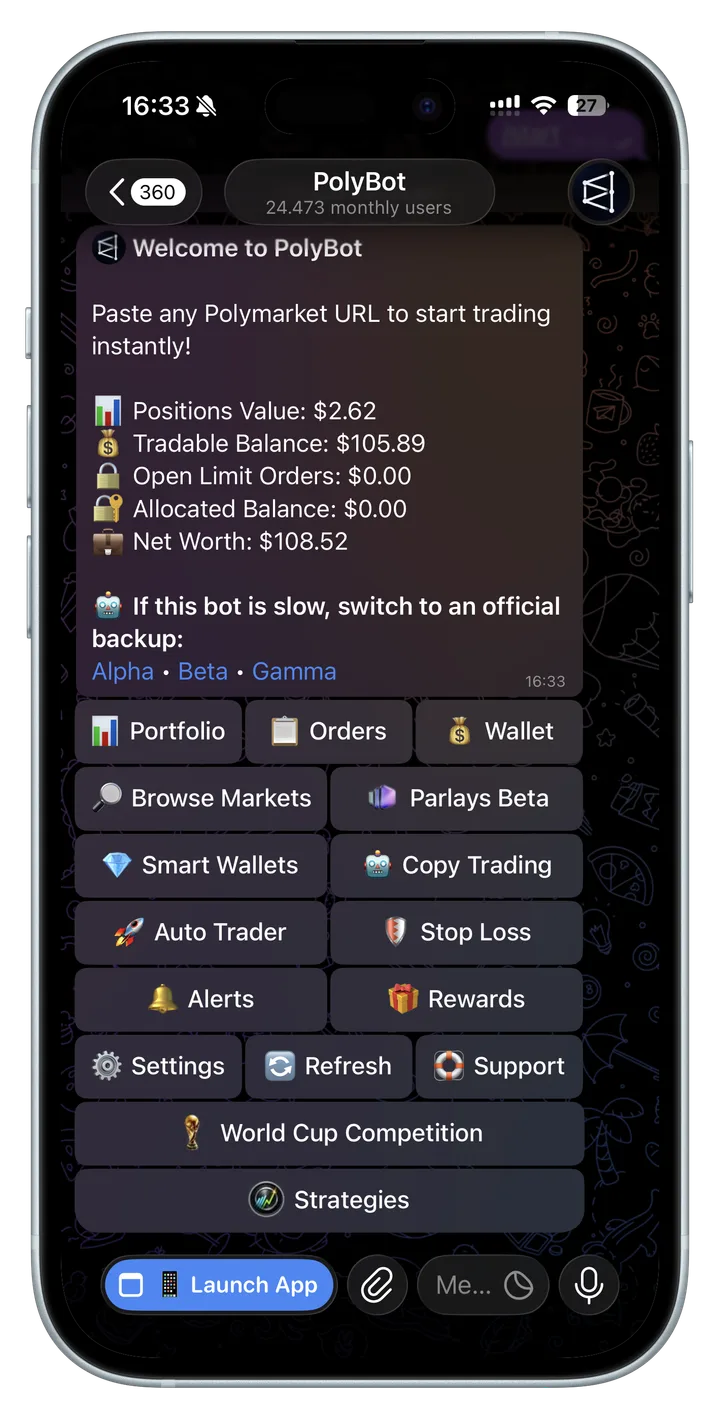
- Open PolyBot's main menu.
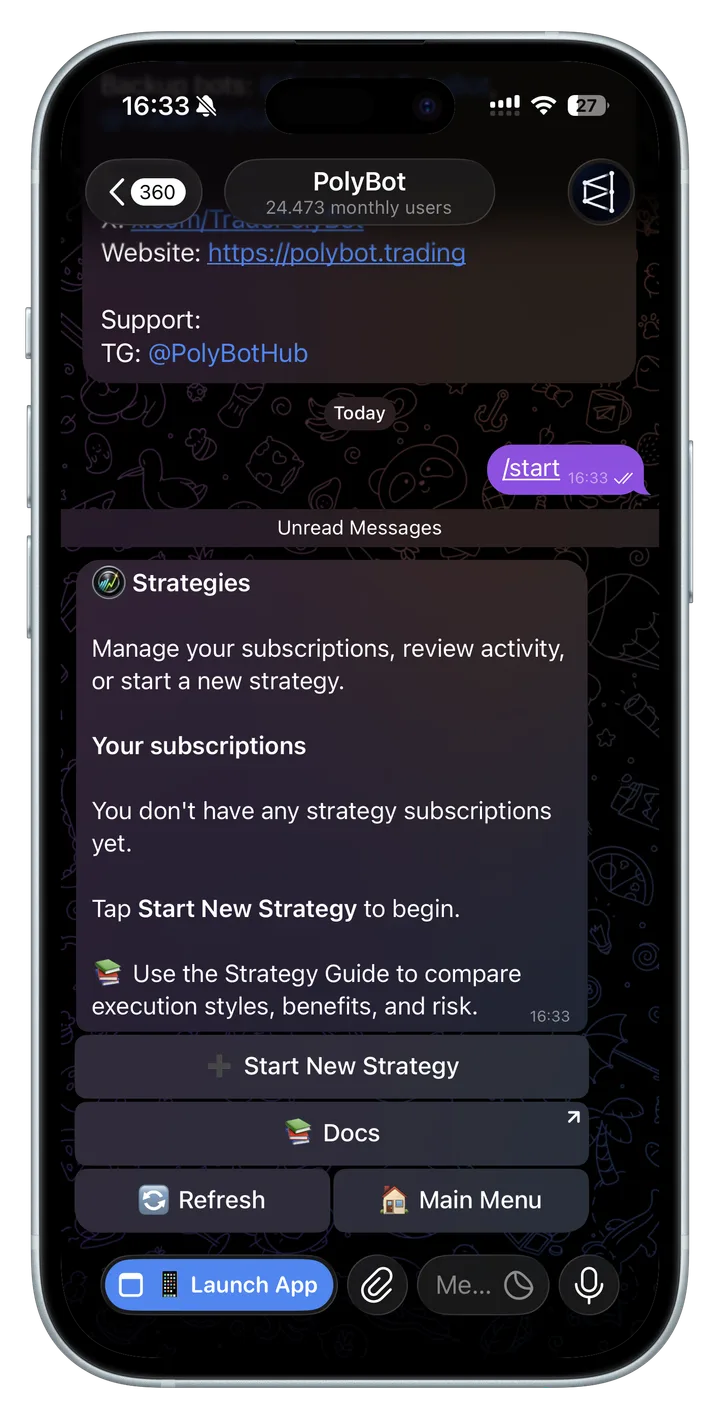
- Tap Strategies.
- Tap Start New Strategy.
- Choose one of the strategies currently available and review its market cycle and execution style.
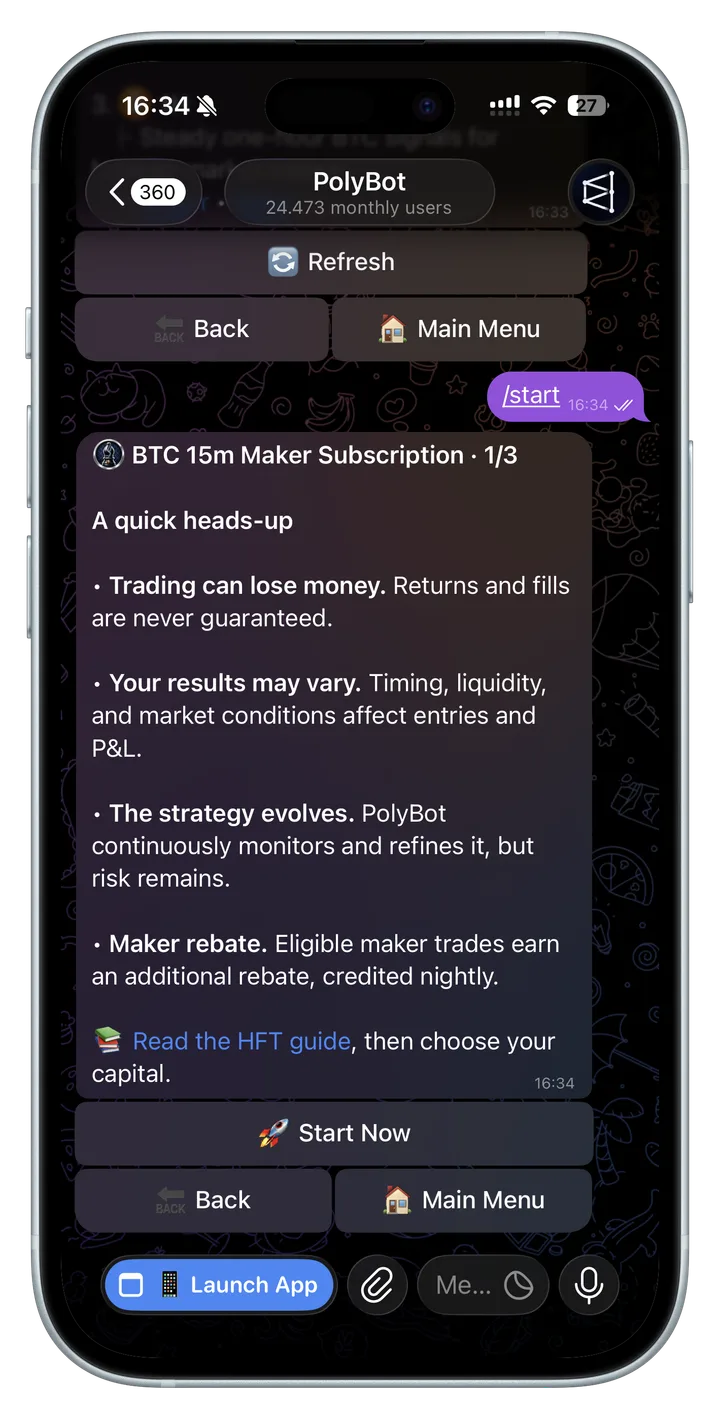
- Read the onboarding and risk overview, and open Docs to review this guide.
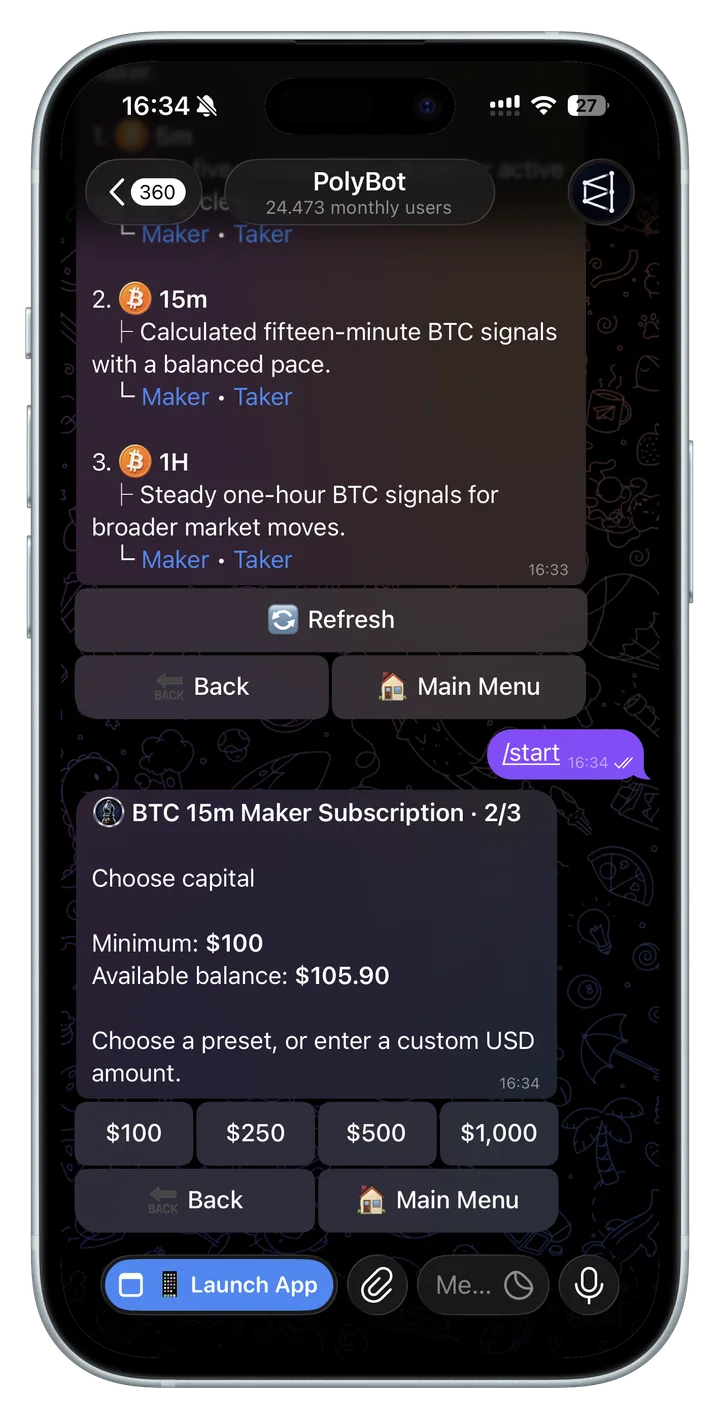
- Continue to the capital step and choose an allocation shown by the bot, or enter a supported custom amount.
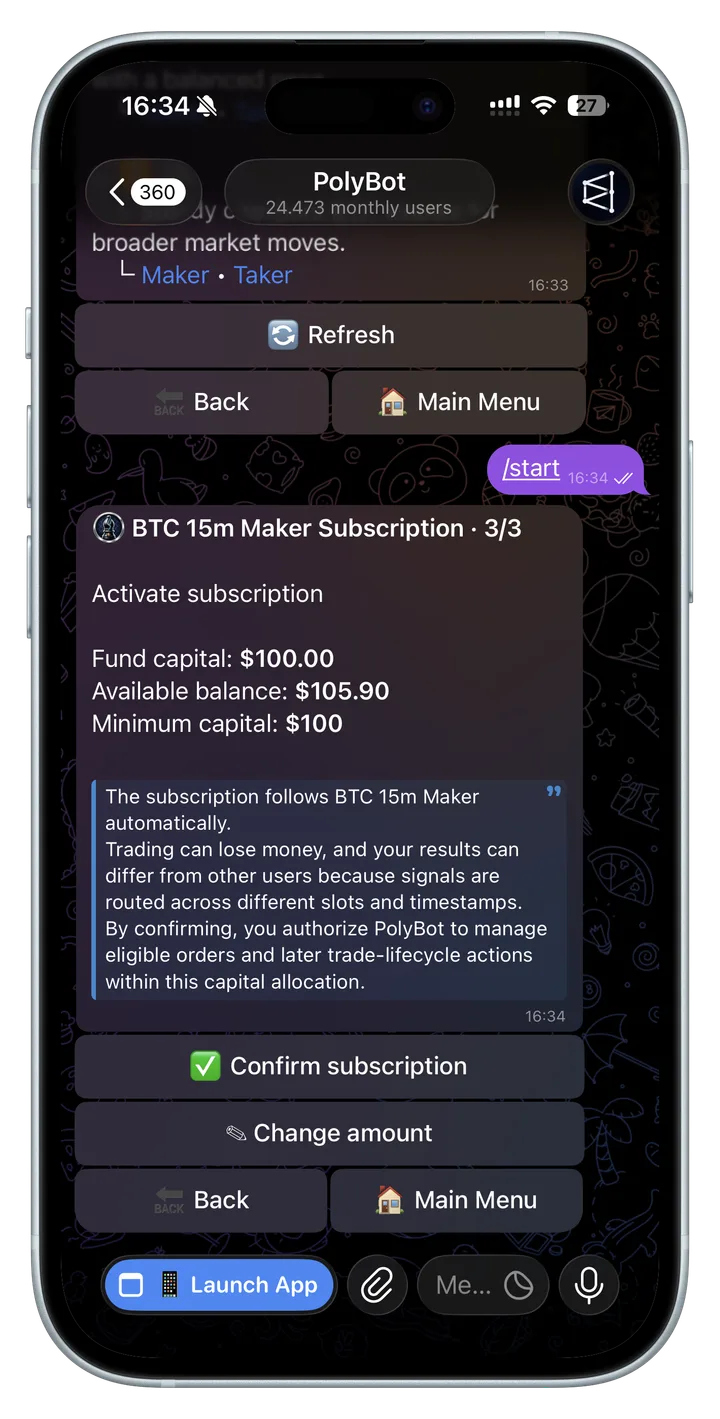
- Review the exact strategy name, execution style, wallet balance, allocation, risk reminder, and authorization.
- Confirm activation.
- Open Activity, Statistics, and notification settings so you know where to review outcomes.
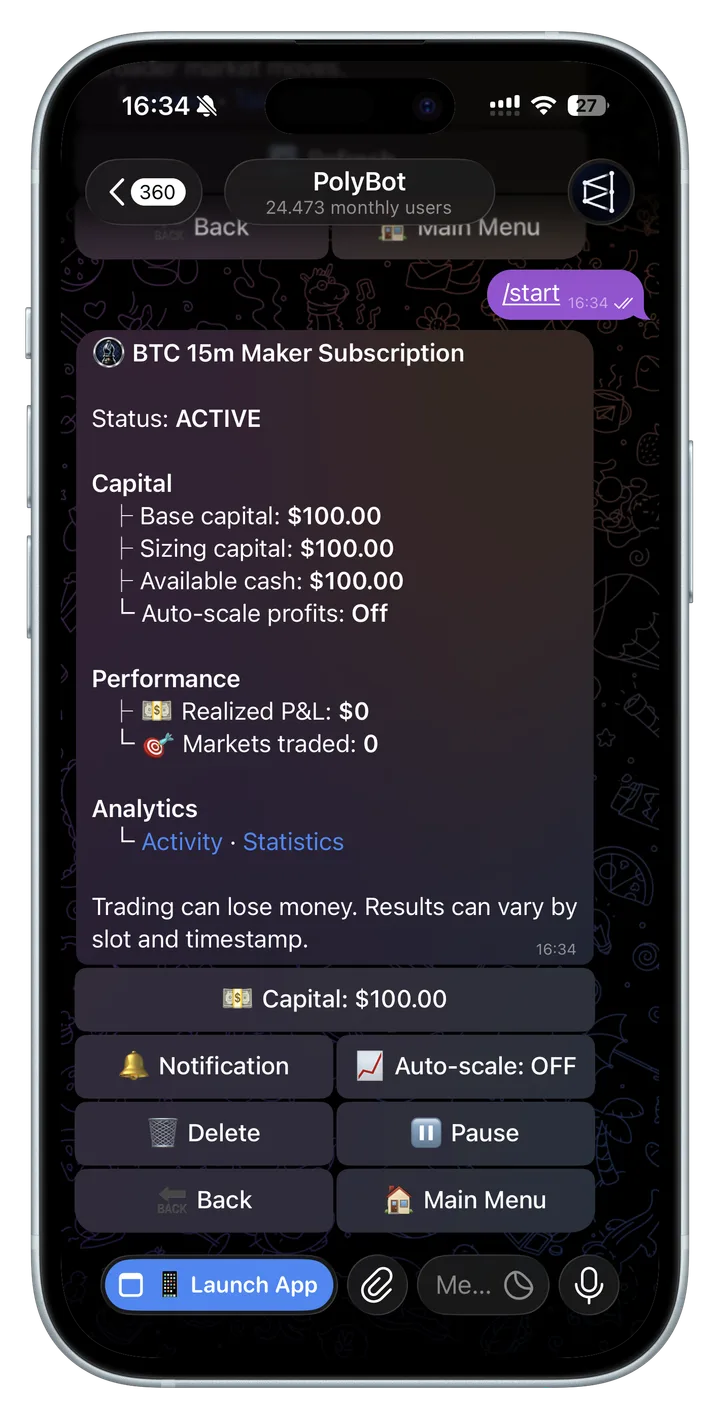
After activation, confirm that the selected strategy shows as ACTIVE. Repeat the flow only if you intentionally want another separate subscription and capital allocation. Do not judge a strategy by one missing signal or one unfilled order; review its own recorded activity over an appropriate period.
The walkthrough below uses BTC 15m Maker as an example. That example may not always be open to new subscriptions. The live bot is the source of truth for currently available strategies, minimum capital, presets, labels, and controls.
Why a signal or trade can be skipped
A skip is not always an error. It often means a rule prevented an unsafe or invalid order.
Common reasons include:
- the signal belongs to a different subscriber time slot;
- the signal expired before execution;
- the subscription is paused or inactive;
- available strategy capital is too low;
- the calculated order is below the platform's minimum size;
- the wallet is already busy with a conflicting operation;
- the order would exceed an exposure or safety limit;
- a Maker order would cross the current spread instead of remaining post-only;
- a Taker order does not have enough suitable liquidity or would fail its execution checks;
- the market is closed, restricted, resolved, or unavailable;
- Polymarket, the network, or another upstream dependency rejected the request.
Read the exact Activity or notification reason. A repeated pattern is more useful than a single skip when deciding whether settings or support investigation are needed.
Filled, skipped, and failed are different
| Result | Meaning | What to do |
|---|---|---|
| Filled | The order has confirmed execution evidence | Review position and performance |
| Partially filled | Only part of the submitted quantity traded | Check the remainder and open orders |
| Open / placed | The limit order exists but is not fully filled | Monitor the order book and order status |
| Skipped | PolyBot intentionally did not submit or continue the trade | Read the skip reason; this may be expected |
| Expired | The short-lived signal or order opportunity became stale | Usually expected in fast markets |
| Failed | An unexpected or terminal execution problem occurred | Check the error and wallet; contact support if repeated |
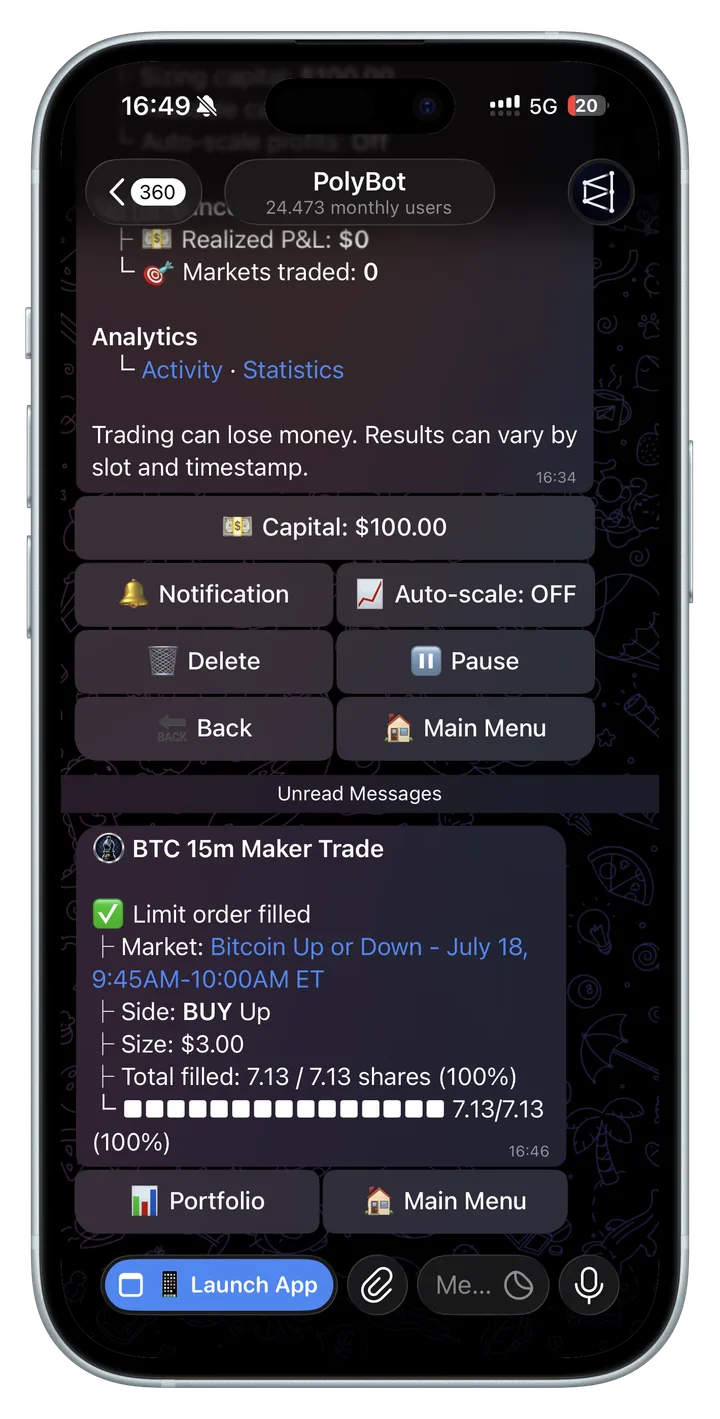
Manage an active strategy
From each managed strategy screen you can review or change:
- Strategy and status — confirm the exact timeframe, Maker or Taker mode, and whether it is active or paused.
- Capital — adjust the dedicated strategy budget.
- Notification Center — control trade, skipped, and failed notifications.
- Activity — inspect recent signals and execution outcomes.
- Performance — review trades, deployed capital, and PnL.
- Docs — reopen this guide, including the risk and slot-routing explanation.
- Pause / Resume — stop new strategy activity without deleting the setup.
- Delete — remove the subscription and release its capital allocation.
Pause versus delete
Pause when you may return later. The subscription and allocation settings remain, but new strategy activity stops while paused.
Delete when you want to leave the strategy. Deletion releases the dedicated capital allocation. It does not magically close unrelated wallet positions; always review Portfolio and Orders too.
Performance and expectations
Performance should be judged per strategy and after fees, spread, slippage, unfilled orders, and losses—not only by the number of winning trades.
Keep these points in mind:
- Historical results do not guarantee future results.
- High trade frequency can compound small execution costs.
- A high win rate can still lose money if losing trades are larger.
- Unrealized PnL can change before a position is closed.
- Different routing slots can produce different results between users.
- A strategy you used before may be updated, paused, or closed to new subscriptions when you return.
- A later version can produce different signals and results, including worse results.
- Pausing during difficult conditions can also change future results; there is no guaranteed optimal timing.
- PolyBot continuously works on the strategy, but a new version or improvement does not guarantee that your next result will be better or profitable.
Start with a small allocation, learn the Activity statuses, and increase only after you understand the behavior and can tolerate the losses. Do not restart or increase a strategy simply to recover an earlier loss.
Planned strategy control room
We plan to connect this guide to a dedicated user-facing strategy control room in the future. The goal is to provide a clearer view of signal flow, order lifecycle, skip reasons, allocation, exposure, and performance across managed strategies in one place.
Until a public control-room link appears here, use each strategy's Activity, Performance, and notification settings, plus Portfolio and Orders, as the source of truth for your account.
Troubleshooting checklist
“My strategy is active but did not trade”
- Confirm it is Active, not Paused.
- Check Activity for routed, skipped, or expired signals.
- Check that capital is available rather than committed elsewhere.
- Review Notification Center settings.
- Remember that time-slot routing means you do not receive every signal.
“Another user received a trade and I did not”
This can be normal because subscriptions use different routing slots. Compare Activity and the recorded reason, not only the final positions.
“The order was placed but I have no position”
A Maker limit order may not have filled; a Taker attempt may also have failed or filled partly. Check Orders for the recorded state and open, partial, canceled, or expired orders.
“The strategy shows a failure”
Review the exact message, wallet balance, Portfolio, and Orders. If the same failure repeats, contact support with the details below.
When contacting support
Send:
- the exact strategy name and subscription identifier if shown;
- approximate signal or order time with timezone;
- the market and outcome;
- the Activity status and exact skip/failure message;
- the order ID, if available;
- screenshots of Activity, Portfolio, and Orders.
Never send your private key or seed phrase. PolyBot support will never ask for it.
Related guides
- Trading Strategies — build your own automated rules
- Portfolio & Orders — check positions and open limit orders
- Stop-Loss Guide — understand triggers, liquidity, and fill risk
- Wallet Guide — understand your self-custodial wallet
- Help & FAQs — support and account help